▶ PREMIUM IPTV STREAMING

XTREME HD IPTV

Stream Live TV, Movies & Series

Get access to a wide variety of live TV channels, on-demand content and entertainment on your favorite supported devices.
Simple setup, flexible plans and reliable customer support.

📺
Live TV
Channels
🎬
Movies &
Series
📱
Works on
Supported Devices
🎧
Customer
Support
Features and content availability may vary by subscription and supported device.
▣ Smart TV
▶ Fire TV
● Android
● iOS
⊞ Windows
◉ Smarters
T TiviMate
▰ MAG Box
DISCOVER XTREME HD IPTV

Stream on Any Device, Anywhere

Stream with the XTREME HD IPTV™ app on smartphones, TV boxes, tablets, Smart TVs and other supported devices.

♢
Anti-Freeze Tech
⚡
Up to 4K Picture Quality
▯
Multi-Device Streaming
XTREME HD IPTV PLANS

Choose Your IPTV Subscription

Select the subscription duration that fits your streaming needs and enjoy live TV, movies, shows and VOD on supported devices.

1 Month

Monthly Access
$ 16.99
USD / month
✓ 22,000+ HD Channels
✓ 90,000+ Movies & Shows
✓ 4K Ultra HD & HDR
✓ Anti-Freeze Streaming
✓ Full EPG TV Guide
✓ 24/7 Live Support
✓ VOD Library Included
GET STARTED →

3 Months

Quarterly Access
$ 35.99
USD / 3 months
✓ 22,000+ HD Channels
✓ 90,000+ Movies & Shows
✓ 4K Ultra HD & HDR
✓ Anti-Freeze Streaming
✓ Full EPG TV Guide
✓ 24/7 Live Support
✓ VOD Library Included
GET STARTED →

12 Months

Annual Access
$ 89.99
USD / 12 months
✓ 22,000+ HD Channels
✓ 90,000+ Movies & Shows
✓ 4K Ultra HD & HDR
✓ Anti-Freeze Streaming
✓ Full EPG TV Guide
✓ 24/7 Live Support
✓ VOD Library Included
GET STARTED →

Prices are displayed in USD. Channel, VOD and feature availability are subject to the selected subscription and supported device.

SIMPLE IPTV SETUP

Get Started in 3 Simple Steps

Getting started with XTREME HD IPTV is simple. Choose your subscription, follow the setup guide for your supported device, and start streaming.

Choose Your Plan

Select the XTREME HD IPTV subscription that matches your preferred duration and complete your order.

Set Up Your Device

Follow the installation instructions for your supported device, including Firestick, Android TV, Smart TV or mobile.

Start Streaming

Sign in with your subscription details and access the content available with your selected plan.

Ready to explore your IPTV subscription options?
VIEW PLANS →
OFFICIAL APP

Watch Anywhere with
the Official Xtreme HD IPTV App

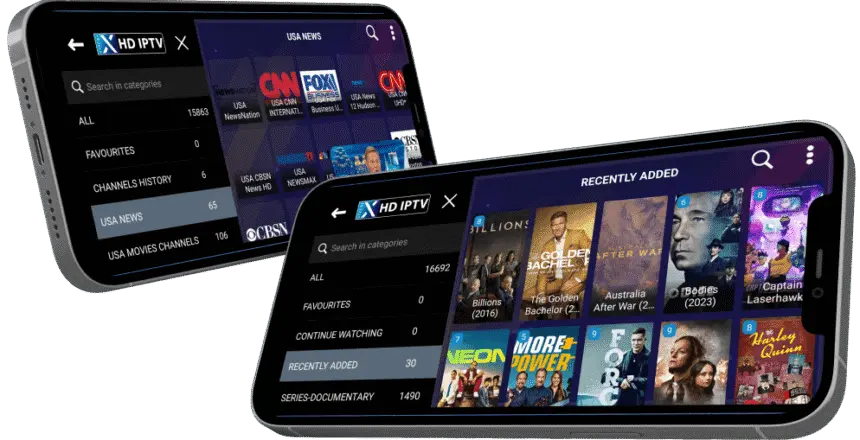
Access live TV, movies, and series on your favorite supported devices with the Xtreme HD IPTV App. Enjoy a simple viewing experience with easy access to your IPTV subscription.

GET THE APP →
App availability and supported devices may vary. Check the setup instructions for your device.
Xtreme HD IPTV app interface on supported mobile devices
CUSTOMER FEEDBACK

What Our Customers Say

See what customers have shared about their experience with XTREME HD IPTV and our support team.

“
★★★★★

The setup process was straightforward and the support team helped me get everything configured on my device. The interface is easy to use and I like having the TV guide available.

JD
James D. United States
Customer
“
★★★★★

I was able to follow the installation guide without any difficulty. The support team responded quickly when I had a question about setting up my TV.

MR
Michael R. Canada
Customer
“
★★★★★

The device setup guide made it easy to get started. I also appreciate the clear subscription options and the help available when I need assistance.

AS
Alex S. United States
Customer
✓
Easy Setup Guides
⚡
Fast Assistance
▣
Multiple Devices
FREQUENTLY ASKED QUESTIONS

Frequently Asked Questions

Find answers to common questions about XTREME HD IPTV, subscriptions, supported devices, setup and customer support.

What is XTREME HD IPTV?

XTREME HD IPTV is an IPTV subscription service that provides access to live television and on-demand content through supported internet-connected devices. Available content and features depend on your selected subscription and supported device.

Which devices are supported?

XTREME HD IPTV can be set up on supported devices such as Amazon Fire TV Stick, Android TV, compatible Smart TVs, Apple devices, computers and other supported IPTV applications. Check the relevant setup guide for your device.

How do I start my IPTV subscription?

Choose the subscription plan that fits your needs, complete your order and follow the activation instructions provided after purchase. You can then use the appropriate setup guide for your supported device.

How do I install IPTV on Firestick?

Select our Firestick setup guide for step-by-step instructions. The guide explains the installation process and the steps needed to configure your IPTV application.

Does XTREME HD IPTV support 4K?

4K Ultra HD content may be available with supported content, subscription plans, devices and internet connections. Your device and display must also support 4K playback.

Is an EPG TV Guide included?

An EPG TV Guide is included with supported subscriptions and compatible applications. EPG availability can depend on the channel, application and device being used.

Does my subscription include VOD?

VOD availability depends on the selected subscription plan. When included, the VOD library provides access to available movies and shows through a compatible IPTV application.

How can I get help with my IPTV setup?

You can use our device-specific setup guides or contact our support team for assistance with subscription activation, application setup and supported-device configuration.

What internet connection do I need for IPTV?

IPTV requires a stable internet connection. The connection speed needed can vary depending on the resolution, application, device and content being streamed.

Can I watch IPTV on multiple devices?

Supported devices can vary by subscription and account configuration. Check the details of your selected plan before purchasing if you need to use IPTV on a particular device.

Still have questions? Our support team can help you with setup and subscription questions.
CONTACT SUPPORT →